
OrgScope Applet Viewer of Network Organization Maps
Experience OrgScope by flying through maps of "Eleum," a fictional company with 4000 employees, 8 levels deep from the CEO to the lowest position. These maps and their network metrics allow you to navigate and evaluate your organization's structure on a secure internal website. Maps represent data from an enterprise HR system (e.g., SAP) as calculated and displayed by the OrgScope application. Web maps can published as a Java applet to an intranet and viewed in a browser, as demonstrated below
CEO View of the Organization and Metrics

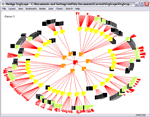
Explore the Eleum demo of a 4000-position organization chart. Click Map 1 to see the whole organization chart as if stretched around a sphere, with all positions connected by their direct reporting relationships. OrgScope calculates “metrics” for every position. Right click on any position and choose Properties to see basic data: organizational level, number of direct reports (span), size of sub-organization, number of locations.

The basic organization chart is the foundation for displaying custom views that more fully depict organizational life. Maps of working networks, such as service groups, leadership councils, and special initiatives, overlay the base organization chart. Map 2 displays relative span of each manager, identifying those with comparatively large staff reporting to them, what we call “hubs in the hierarchy, and layers that include contractors (adding nodes) and matrix reports (adding links). In Map 3, see a leadership network, showing the ability to highlight selected nodes. Layers detailing one (top) team's relationships is shown in Map 4.

Map 1. Base
Map 2. Matrix Spans
OrgScopes calculates each position's level and color-codes it accordingly. Non-manager staff display in black. Select Person from menu bar to see people's photos; Select Place to see country flags, indicating locations of each position. Example of making a metric visible. Red disks indicate relative size of each manager's direct reporting span. The larger the staff, the bigger the disk. Positions with largest staff have largest disks. Allows quick visual inspection of positions with largest managerial load.
Add Perspectives and Locations
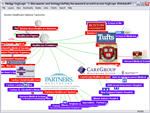
These maps offer higher-level perspectives of enterprise-wide relationships. By adding a higher-level node above the base organization chart, it's possible to see many views at once. See Map 4 for a meta view of Eleum's many leadership networks, including a view of leadership positions by site location. Map 7 connects all positions by location.
Map 3. Leader Net
Map 4. Exec Team Detail
Establishes external Leadership Network view and (group) links to hierarchy. Orientation is down, tree style. Adds external site structure to meta node with links to leadership members by place. Here we show only the top three levels, with detail of matrix, process, group, and information links in the executive team. Local portions of the organization may overlay detailed network maps of their operations and relationships.
NetAge OrgScope: Maps